For developers, note‑taking is not optional – it’s part of the daily workflow. Whether you are documenting a new API, drafting a design proposal, or simply keeping a to‑do list, you need a tool that respects your time and your code.
NoteTaker is a cross‑platform desktop application built with Java that focuses on one thing: making Markdown note‑taking frictionless. It is not another cloud‑based editor with dozens of bells and whistles. It is a local, fast, and predictable tool that fits into a developer’s environment.
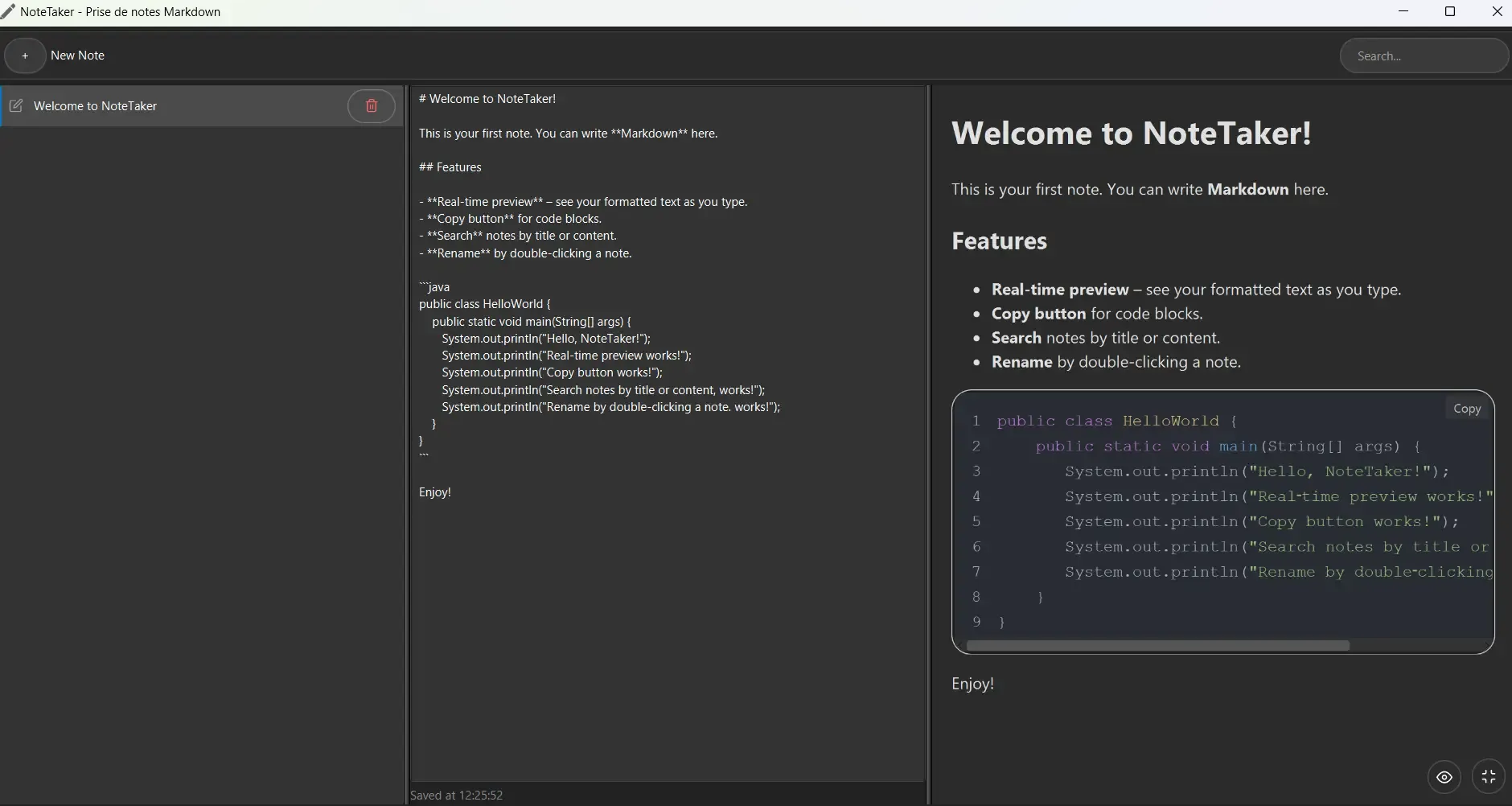
#Why NoteTaker helps developers
#1. Markdown + real‑time preview
Developers write in Markdown – it’s the lingua franca of technical documentation. NoteTaker renders your notes as HTML as you type, so you see headings, lists, tables, and code blocks instantly. No switching between edit and preview modes.
#2. Syntax highlighting and one‑click copy
Code blocks are automatically highlighted using Highlight.js, and every code block comes with a “Copy” button. You can quickly share snippets without selecting and copying manually.
#3. Full‑text search
Notes accumulate fast. NoteTaker indexes titles and content, allowing you to search instantly. No external indexing engine – just a simple, reliable filter.
#4. Auto‑save
Forget about Ctrl+S. Every change is saved after two seconds of inactivity. Your notes persist even if the application crashes.
#5. Distraction‑free modes
- Full‑screen preview ([ ]) hides the editor and lets you focus on reading.
- Toggle panels (eye button) removes the note list and editor, leaving only the preview – ideal for presentations or reading long documents.
#6. Native installers, no Java required
NoteTaker is packaged with jpackage into native installers for Windows (.msi) and Linux (.deb). Users get a real application, not a JAR file. The JRE is bundled, so no extra Java installation is needed.
#7. CI/CD ready
The project includes GitHub Actions workflows that build and test on every push, and automatically create release artifacts when a tag is pushed. For developers who want to contribute or fork, the build process is fully automated.
#Who is NoteTaker for?
- Solo developers who want a local, offline note‑taking tool.
- Students learning Markdown and programming.
- Technical writers who need a lightweight preview environment.
- Open‑source contributors who want to understand a modern JavaFX application.
#Do you want to try it?
Download the latest installers for Windows (.msi) and Linux (.deb) from the GitHub Releases page. No Java installation is required – the JRE is bundled.
#Getting started
You can download the latest installers from the GitHub Releases page. The source code is available under the MIT license.
If you prefer to build from source, you only need JDK 21 and Maven:
git clone https://github.com/adnenre/notetaker.git
cd notetaker
mvn clean package
For more details, check the README.
#Final thoughts
NoteTaker does not try to replace large note‑taking ecosystems. It solves a simple problem well: write Markdown, preview instantly, keep your notes local. For developers who value speed, transparency, and control, it is a practical addition to the toolbox.
If you try it and find a bug or missing feature, please open an issue or submit a pull request. Contributions are welcome.
NoteTaker is maintained as a free and open‑source project. It uses JavaFX, Flexmark, Highlight.js, and Ikonli – all great tools that make this kind of application possible.